


Stand: 2016. Dieser Fachartikel ist als Archiv-Beitrag verfügbar. Preise, Tools und Verfügbarkeiten haben sich seither geändert.
Status: 2016. This article is archived as reference. Prices, tools and availability have changed since.
Why even a guide?
Of course, you can just go and buy a computer and hope you get lucky ending up with a system that works great. If thats your plan, get a current Mac Pro with 32GB of RAM and add a Thunderbolt oder Audio over Ethernet Audio-Interface that has lots of great independent reviews from users. Between 5 – 12.000 US $ should get you there.
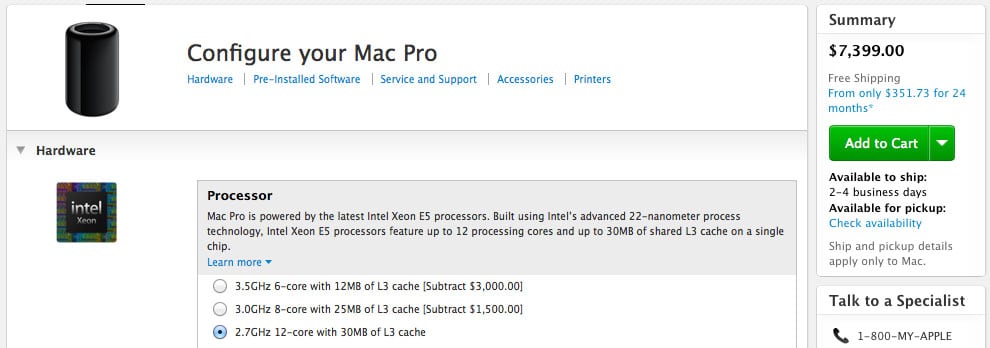
„Are you serious?“
Yes and no – read this guide carefully, and dig further into the recommended links, and you might be able to come up with a solution that is costing a fraction of that.
Mac or PC?
The question is not Mac or PC – it’s „Mac OS X or Windows?“. Any current Mac can run both, and you can build your own PC that – with a few tricks – can run Mac OS X (some people call it a “Hackintosh”, but it’s just a PC that uses industry standard parts). Since early 2006, which means for almost 10 years, Macs are basically PCs based on certain selected Intel-CPUs (i5, i7 or Xeon). Most higher end PCs (all of them except those running with an Atom, Pentium or Celeron CPU) are very similar to Macs in regards to the architecture of the computer (Motherboard, CPU, Graphics-Chip, RAM).
Most professionals use Mac OS X, but a computer running Windows can perform equally well or better – in the end it comes down to what you grew up with, and what DAW-software you like to work with. Consider that a fresh install of Mac OS X does not need to be costumized further, whereas many pre-configured Windows-machines are bloated with lots of annoying freeware which will frequently ask you to update, upgrade or buy the full version of the software. If you have the time or knowledge, you can buy a so called “Systembuilder”-version of Windows.
It requires a certain level of expertise to install a Windows-system that is stripped down to the essentials for optimized audio performance. If you don’t have the expertise, consider hiring someone who is specialized in installing Windows-systems for professional audio use.
Measuring System Performance with Geekbench
The software Geekbench is available for all current operating systems, for Mac OS X, Windows, Linux, and even iOS and Android-tablets/phones.
Install and run it on your current computer to get an idea of the power that you have available and that you are looking for in the future. There are other popular benchmark-programs that are more focussed on graphics-performance, but DAW software has no special requirements in regards to graphic-power when compared to games or 3D-rendering.
What’s a good Geekbench score?
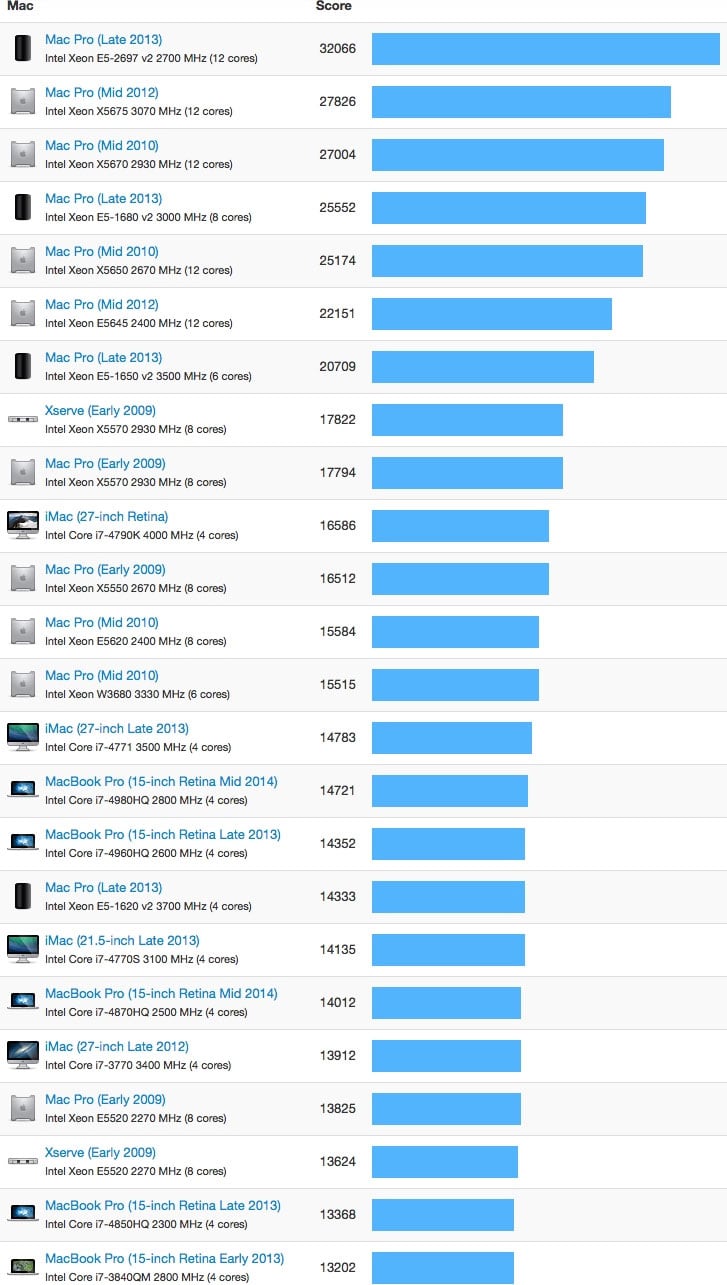
At the time of writing this article (March 2016), I would say the absolute minimum 64bit Multicore-Score that you need to see from your machine is around 10.000. Your CPU needs a minimum of 4 Cores to produce this result. Even the fastest current 2 core-machine maxes out at 7432 (2015 Mac Book Pro 13” Retina), while a 2008 Mac Pro with 8 Cores, a 7 year old machine that can be had on the used market for under 1.000 US $, still produces a score of 11306.
At the same time, to be future proof, I recommend to get a machine that gets a result of around 13000 to 15000. All current Macs with i7 4-Core processors can score that, and of course all models of the current Mac Pro, and even older Mac Pro’s build after 2009. Current Macs that fall NOT into this category are ALL MacBook Airs, the Mac Book Pro 13” (incl. the Retina-model) and the new small 12” MacBook Retina – avoid these for professional audio use. While some of these can be costum-ordered with an i7-processor, these are only 2-core processors (2 real cores + 2 virtual core for hyper threading ), which is not sufficient for the kind of CPU-power we need.
Chart: 64bit Multicore Geekbench-Chart April 2015 – higher value means faster computer.
If you want to see the benchmarks for the most popular current processors, independent from running Mac or Windows, you can have a look at this chart. However, not of all these are supported by Mac OS X, in case you want to build your own machine that is compatible to both Windows and Mac OS X.
Single-Core vs. Multi-Core performance
Unfortunately, things are not as easy as only looking at the Multicore Performance. The majority of tasks that we do on our computers are calculated on only the first of the many available processor-cores, and if the speed of that one, single processor core is not sufficient, our computer feels annoyingly slow. To understand what’s going on, let’s first look at the Single-Core Geekbench-Chart. It’s the same test as above, but this test is only using the first of the many available CPU-cores, and is a much closer indicator of how fast our machine “feels” when not using multiple cores.
Chart: 64bit Singlecore Geekbench-Chart April 2015
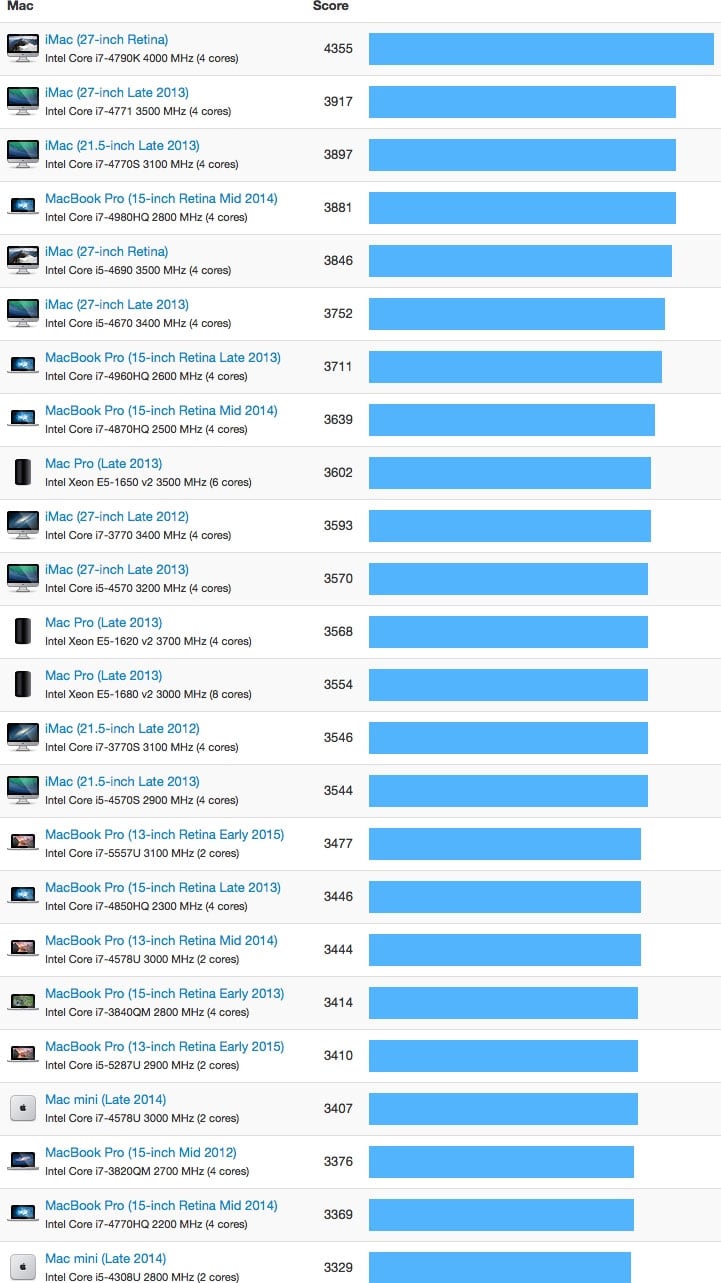
When testing for Single Core Performance, we see non of the Mac Pro’s leading the charts. It’s the iMac’s and MacBook Pro’s topping the chart with scores around and slightly below 4000. Especially older Mac Pro’s, like the 2008 Mac Pro with 8 Cores, can’t even compete with current entry-level Macs. It scores at 1870, which is around the speed of the current iPhone 6.
The reasons are as follows:
• each new generation of CPUs is more powerful; Intel usually introduces a new generation every year, following what they call the “Tick-Tock model” (which goes beyond the scope of this article, but in short after advancing manufacturing technology aka “tick”, they follow up a year later with a new micro architecture aka “tock”.
• with new generations of CPUs, new components are introduced – faster memory, faster PCIe-lanes for graphics, faster internal graphics onboard with the processor, faster interfaces for hard drives/SSDs, etc.
• CPUs with more cores generate more heat and for that reason, need to be clocked lower; if you look at the different models of Mac Pro’s this is easy to follow:
Mac Pro 4-Core runs at 3700 MHz (Intel Xeon E5-1620 v2) – 3.499 US $ with 32GB RAM
Mac Pro 6-Core runs at 3500 MHz (Intel Xeon E5-1650 v2) – 3.999 US $ with 32GB RAM
Mac Pro 8-Core runs at 3000 MHz (Intel Xeon E5-1680 v2) – 5.499 US $ with 32GB RAM
Mac Pro 12-Core runs at 2700 MHz (Intel Xeon E5-2697 v2) – 6.999 US $ with 32GB RAM
In summary, the problem is not that the 12-Core is not a great machine, despite comparable poor single core results. The problem is the price difference.
With that, let’s go into detailed recommendations!
Helpful Links
eBook YOUR MIX SUCKS
The next update of my best-selling eBook YOUR MIX SUCKS will have an expanded version of this article with more recommendations and example systems as a bonus chapter. All current buyers of the book will get the new version as an update in May. The book is currently still available at introduction price.
tonymacx86.com
If your want to build your own PC running OS X as your main operating system, this website is a resource for all you need to know.
Geekbench 3
Geekbench 3 is Primate Labs’ cross-platform processor benchmark, with a new scoring system that separates single-core and multi-core performance, and new workloads that simulate real-world scenarios. Geekbench 3 makes it easier than ever to find out if your computer is up to speed.
Mac Performance Guide
Lloyd Chambers website and blog has a lot of great articles for pro users that use Mac OS X. The site will help you to get more performance out your Mac.